|
|
Microsoft Streets & Trips 2006 with GPS Locator
by Chris Taylor
If I am ever
stranded on a deserted island and can have only one book,
undoubtedly, I want National Geographic Atlas of the
World. I love maps. And that extends down to street
maps. Maybe it has something to do with the “guy
thing” of not wanting to ask for directions.
There are many options for accessing street maps for
free, including Google Earth, MapQuest, and
Microsoft’s Windows Live Local. Even the Ontario
Ministry of Transportation offers downloadable road maps
in Adobe Reader format.
With many free choices for maps, why would anyone buy a
mapping program? For me, it was the richness I found in
Streets & Trips (S&T) that attracted me. It
provides street-level maps for almost all communities in
Canada and the U.S.
For trip planning, S&T has some great tools. You can
look up locations and S&T will zoom to that spot.
Mark one spot as a starting point and another as the end
and S&T will calculate the route and highlight it on
the map. If you don’t like the route S&T
calculates, you can highlight the route and drag it where
you want. S&T recalculates the route to pass that
way. You can mark an area you want to avoid. You can have
it find the fastest route or the shortest route. It will
even calculate the estimated time and gas costs.
You can easily change what landmarks are shown by
S&T, choosing from 51 different categories including
15 different cuisines for restaurants. In all, there are
1.8 million points of interest.
 Print options include overview maps, strip maps, turn by
turn maps (which show close ups of places where you have
to change direction), and you can print driving
directions.
Print options include overview maps, strip maps, turn by
turn maps (which show close ups of places where you have
to change direction), and you can print driving
directions.
I like using free mapping sites on the Internet. But I
like the idea of having all the data with me on my
laptop’s hard drive. When I am on the road, I can
look up new information, change my route, and find
interesting areas nearby.
The full name of Streets & Trips with GPS Locator
gives away the most fascinating thing about this version
of S&T – the included Global Positioning System
locator. This magical little two-inch square piece of
plastic encases a GPS receiver; the Pharos GPS-360.
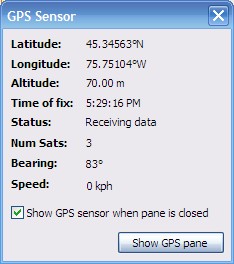
Just plug
the six-foot USB cable into your computer, run S&T
and bring up the GPS Task Pane. As soon as the receiver
synchs up with enough satellites, it displays your
current location on the map. As well, it displays your
latitude and longitude, altitude, speed, and direction.
Options include the ability to keep yourself centered on
the map, rotate the map so your current direction is
always upward on the screen, and having a blue trail show
where you have traveled.
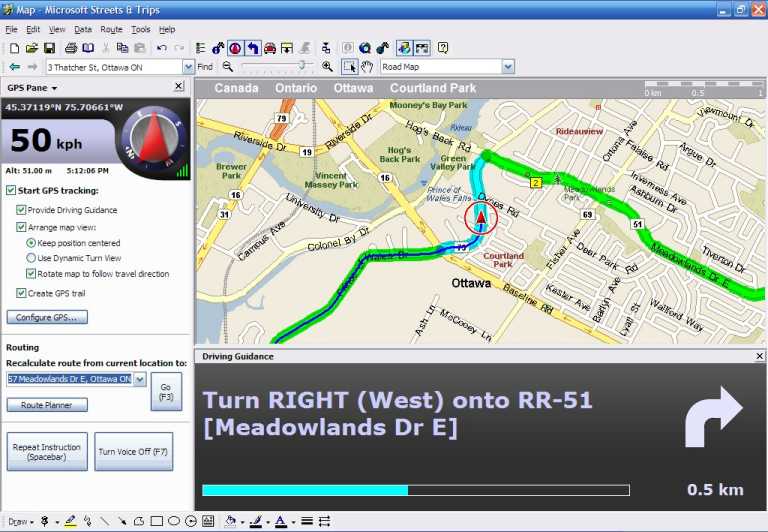
Screenshot: "On the way home"
New to
version 2006 is the ability to have S&T speak
directions to you as you travel along a route. While this
is a really terrific feature, it uses the generic speech
engine built into Windows XP. This was puzzling to me.
Because it is a generic voice engine, it will try to
pronounce anything, even that magical word from Colossal
Cave Adventure game; XYZZY. As such, its pronunciation
frequently leaves something to be desired. But S&T
has a very limited vocabulary. I may be wrong, but
phrases such as “Turn left in one point four
kilometres”, “In two kilometres, continue
straight” and “In three hundred metres, arrive
at destination” seem to be about the extent of what
it will say. S&T will not even attempt to tell you a
street name to turn onto. As such, I think it would
provide much clearer speech if it used canned sound
snippets to generate the audible instructions.
That quibble aside, I love the GPS feature. The accuracy
is quite good. If there are at least 3 satellites in
view, which is normally the case, I find the position is
accurate to within about 10 or 20 meters. With 5 or 6
satellites in view, the accuracy is about 5 metres or
less.
Even if not using the GPS interactively, having it with
me when I am on a trip guarantees I will never remain
lost for long. I can just boot up the computer, and in
minutes, I will know where I am within a few metres. And
I don’t have to ask for directions.
System requirements:
Windows 2000 or XP (XP required for voice output).
Minimum disk space 500 MB (1.1 GB for full install)
Bottom Line:
Microsoft Streets & Trips 2006 with GPS Locator
Street price in Ottawa - $130
Microsoft Corporation
Originally published: October, 2006
top of page
|
Archived Reviews
A-J
K-Q
R-Z
The opinions expressed in these reviews
do not necessarily represent the views of the
Ottawa PC Users' Group or its members.
|
